Scal.Sdk.Abstractions
0.1.1-alpha.0
dotnet add package Scal.Sdk.Abstractions --version 0.1.1-alpha.0
NuGet\Install-Package Scal.Sdk.Abstractions -Version 0.1.1-alpha.0
<PackageReference Include="Scal.Sdk.Abstractions" Version="0.1.1-alpha.0" />
<PackageVersion Include="Scal.Sdk.Abstractions" Version="0.1.1-alpha.0" />
<PackageReference Include="Scal.Sdk.Abstractions" />
paket add Scal.Sdk.Abstractions --version 0.1.1-alpha.0
#r "nuget: Scal.Sdk.Abstractions, 0.1.1-alpha.0"
#:package Scal.Sdk.Abstractions@0.1.1-alpha.0
#addin nuget:?package=Scal.Sdk.Abstractions&version=0.1.1-alpha.0&prerelease
#tool nuget:?package=Scal.Sdk.Abstractions&version=0.1.1-alpha.0&prerelease
Scal.Sdk.Abstractions
A foundational MSBuild Sdk that standardizes build behavior, metadata validation, and versioning across DotNet and non-DotNet projects.
Philosophy
Modern projects mix technologies, runtimes, and build systems. Projects tend to drift over time. Build behavior, metadata, and versioning rules become inconsistent across repositories.
The Scal Sdk ecosystem is built on four principles to reduce the drift:
Uniformity over fragmentation
Every project — DotNet, PowerShell, or non-DotNet — share a consistent build surface and CLI workflow.
Convention over repetition
Metadata validation, versioning rules, and target orchestration should not be rewritten in every repository.
Explicit metadata
Required metadata enforces clarity, traceability, and packaging discipline.
Composable foundations
Each Sdk is a layer that adds responsibility without breaking extensibility.
Overview
Scal.Sdk.Abstractions defines common build targets and conventions used by the Scal Sdk ecosystem. It provides a consistent MSBuild surface while remaining minimal and composable.
Design Principles
- Consistency – Uniform build experience via dotnet / MSBuild CLI
- Validation – Enforce required project metadata
- Versioning – Semantic versioning based on Conventional Commits
- Documentation - Description diagrams, ReadMe, ChangeLog and citations are part of the produced artifact
- Minimalism – Provide extensibility without imposing structure
Features
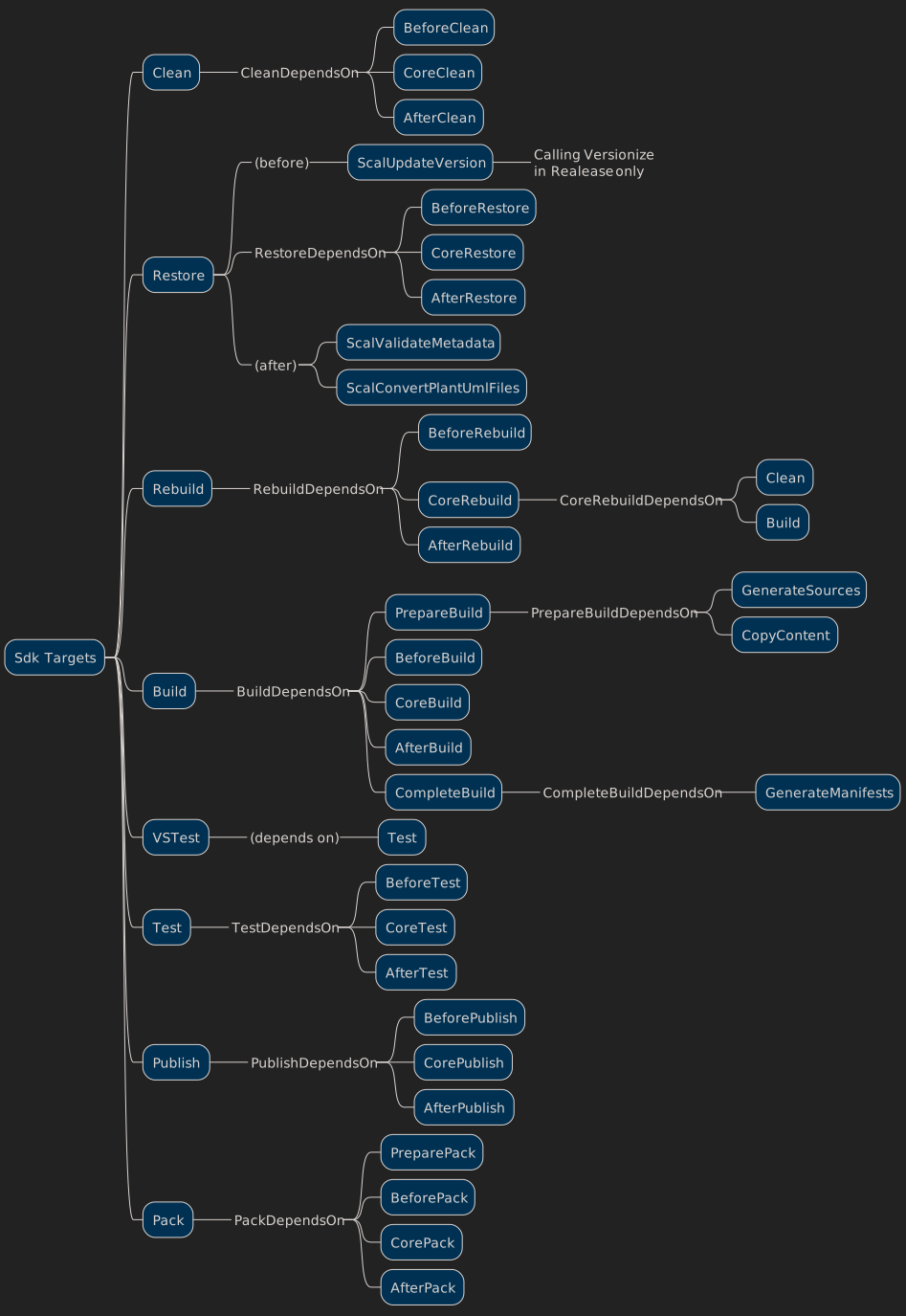
- Define MSBuild targets usable for non-DotNet projects (see below)
- Clean
- Restore
- Build
- Rebuild
- Test
- Publish
- Pack
- Defines extension points via pre- and post-target dependencies
- Executes Versionize before restore during Release builds
Integration
- Reuse standard targets from a base Sdk when specified (e.g., Microsoft.NET.Sdk, Web Sdk)
- Collects release notes prior to GenerateNuspec when applicable
- Ensures Sdk package restoration through MSBuild Sdk import
Why use Scal.Sdk.Abstractions?
- Centralize build conventions across repositories
- Avoid duplicating MSBuild target definitions
- Enforce metadata discipline
- Share a unified versioning strategy
- Support heterogeneous build ecosystems
Dependencies
- PlantUml (unless disabled via ScalSdkUsePlantUml false)
- Versionize (unless disabled via ScalSdkVersionize false)
On Windows, the Chocolatey installation of PlantUml adds a PlantUmlC.exe shim available in the Path.
Versionize is supposed to be installed as tool in the project, e.g. dotnet tool install --local Versionize --create-manifest-if-needed
Sdk Ecosystem
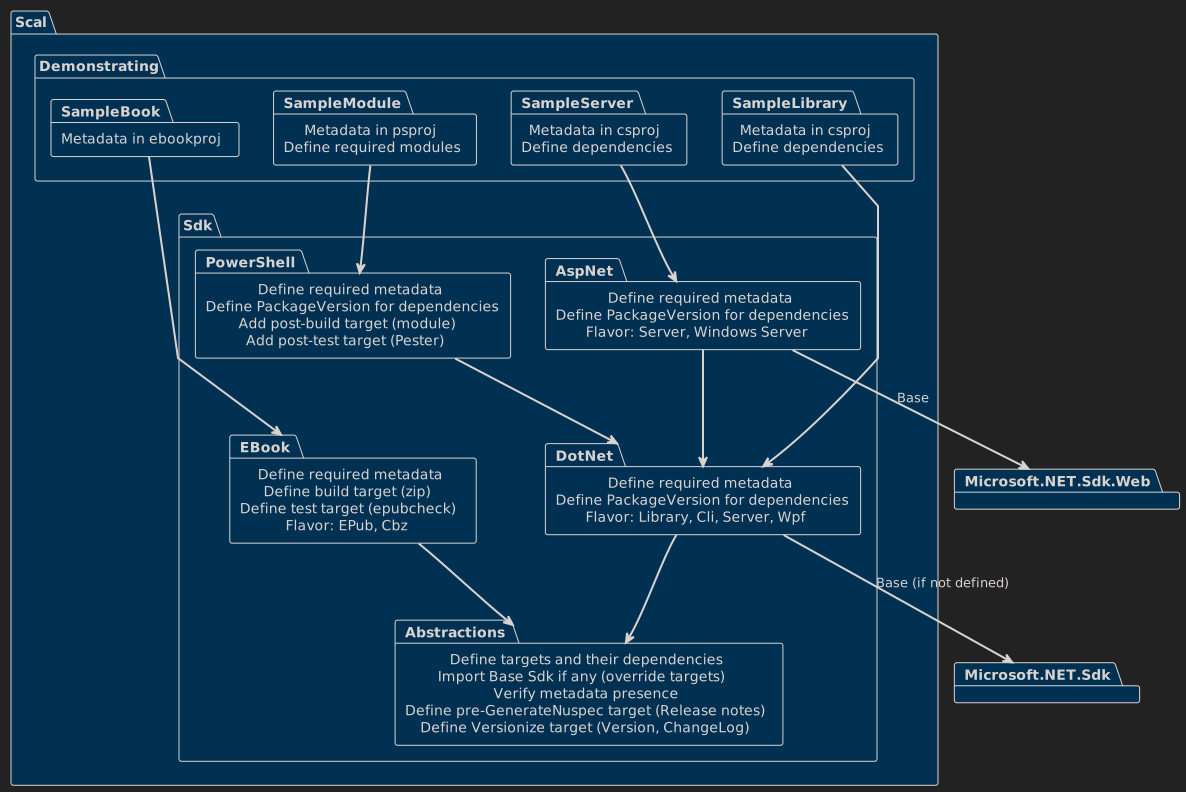
Scal.Sdk.Abstractions is used directly or indirectly by:
| Sdk | Purpose |
|---|---|
| Scal.Sdk.AspNet | AspNet applications |
| Scal.Sdk.DotNet | DotNet libraries and applications |
| Scal.Sdk.EBook | ePub books and CBZ comics (Build and Test) |
| Scal.Sdk.PowerShell | PowerShell modules (binary, script, hybrid) |
It can be used to define a custom Sdk with a minimal effort by defining only the desired targets and required metadata, as done in EBook.
MSBuild Configuration
Properties and items are prefixed with ScalSdk to avoid name collisions.
Sdk Configuration
| Type | Name | Description | Example |
|---|---|---|---|
| Property | ScalSdkBase | Base versionless Sdk the project builds upon | Microsoft.NET.Sdk |
| Property | ScalSdkPlantUml | Enables or disables PlantUml (default: true) | true or false |
| Property | ScalSdkPlantUmlCommand | PlantUml Cli<br/>(default: PlantUmlC of Windows, java -jar $(ScalSdkPlantUmlJarPath) otherwise) | /bin/java -jar /usr/bin/plantum.jar |
| Property | ScalSdkPlantUmlFormat | PlantUml output format (default: svg) | png or svg |
| Property | ScalSdkPlantUmlJarPath | Path to the PlantUml jar file on non-Windows systems (default: plantuml.jar) | /usr/bin/plantum.jar |
| Property | ScalSdkPlantUmlParameters | Additional PlantUml parameters (no default) | --dark-mode |
| Property | ScalSdkRequiredProperties | Semicolon-separated list of required project properties | Description;PackageTags;PackageLicenseExpression |
| Property | ScalSdkVersionize | Enables or disables Versionize (default: true) | true or false |
| Property | ScalSdkVersionizeConfigName | Configuration file name (default: .versionize) | Must be this name, see see issue 200 |
| Property | ScalSdkVersionizeConfigPath | Path to the .config directory | |
| Property | ScalSdkVersionizeParameters | Additional Versionize parameters (no default) | --find-release-commit-via-message |
Sdk Documentation
The following are updated by each Sdk level for documentation purpose:
| Type | Name | Description |
|---|---|---|
| Item | ScalSdkBaseline | Items containing the imported PackageVersion baselines with Version metadata |
| Property | ScalSdks | Semicolon-separated list of Sdk's involved, in import order |
Usual Project Structure
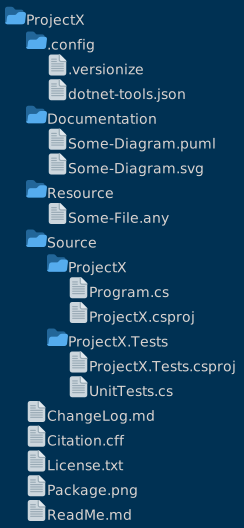
Note: The Citation File is intent to contain not only the author of the package but also the references and licenses of components used by this project.
Note: Those files and directories, if present, are added to the package Content ItemGroup.
⚠️ Beware that if your filesystem is still case-sensitive in 2026 and you have the habit of shouted file names, the defaults use the less aggressive Pascal-casing convention.
In a structure like this, the ScalProjectRoot property is set to the root ProjectX and used to determine where to search for .puml files to convert. A Sdk or project may set this property to another value if necessary.
| Type | Name | Description |
|---|---|---|
| Property | PackageIcon | Default: Package.png |
| Property | PackageReadmeFile | Default: ReadMe.md |
| Property | ScalProjectChangeLogFileName | Default: ChangeLog.md |
| Property | ScalProjectChangeLogFilePath | Default: anywhere in or above the project directory |
| Property | ScalProjectCitationFileName | Default: Citation.cff |
| Property | ScalProjectCitationFilePath | Default: anywhere in or above the project directory |
| Property | ScalProjectDocumentationPath | Default: Documentation directory anywhere in or above the project directory |
| Property | ScalProjectLicenseFileName | Default: License.txt |
| Property | ScalProjectLicenseFilePath | Default: anywhere in or above the project directory |
| Property | ScalProjectReadMeFileName | Default: $(PackageReadMe) |
| Property | ScalProjectReadMeFilePath | Default: anywhere in or above the project directory |
| Property | ScalProjectResourcePath | Default: Resource directory anywhere in or above the project directory |
| Property | ScalProjectRoot | Very root of the project's repository |
Example
Here is an example of custom Sdk with a Build and a Test targets based on a custom programs.
Your Sdk
In Sdk.props:
<Project>
    <PropertyGroup>
        <ScalSdkVersionize>false</ScalSdkVersionize>
        <ScalSdkRequiredProperties>Description;YourOption</ScalSdkRequiredProperties>
    </PropertyGroup>
    <Import Sdk="Scal.Sdk.Abstractions.Sdk" Version="1.0.0" Project="Sdk.props" />
</Project>
In Sdk.targets:
<Project>
    <Import Sdk="Scal.Sdk.Abstractions" Version="1.0.0" Project="Sdk.targets" />
    <Target Name="CoreRebuild">
        <Exec Command="YourBuilder.exe '$(Description)'"
            WorkingDirectory="$(MSBuildProjectDirectory)" ConsoleToMSBuild="true" StandardOutputImportance="High" />
    </Target>
    <Target Name="CoreTest">
        <Exec Command="YourTester.exe Option=$(YourOption)"
            WorkingDirectory="$(MSBuildProjectDirectory)" ConsoleToMSBuild="true" StandardOutputImportance="High" />
    </Target>
</Project>
Importing Scal.Sdk.Abstractions this way ensures the Sdk package is restored automatically by NuGet.
Using your Sdk locally
You may now use this Sdk in a project locally, in which case the two Sdk files above must be in a directory Sdk:
<Project Sdk="C:\Sdks\Example">
    <PropertyGroup>
        <Description>Test</Description>
        <YourOption>true</YourOption>
    </PropertyGroup>
</Project>
⚠️ A Sdk defined using a local path only works on Windows.
Using your Sdk from a package repository
If you publish your Sdk in a local repository you define as source or directly on NuGet:
<Project Sdk="YourSdk/1.0.0">
    <PropertyGroup>
        <Description>Test</Description>
        <YourOption>true</YourOption>
    </PropertyGroup>
</Project>
⚠️ A Sdk defined as package reference like this must contain a version without '*'.
Using your Sdk from a package repository but isolate the version
Alternatively, if you do not want to specify the version in the project file, you may specify it in a global.json file. The project file becomes:
<Project Sdk="YourSdk">
    <PropertyGroup>
        <Description>Test</Description>
        <YourOption>true</YourOption>
    </PropertyGroup>
</Project>
with a global.json file:
{
  "msbuild-sdks": {
    "YourSdk": "1.0.0"
  }
}
Sdk messages
| Code | Severity | Message | Note |
|---|---|---|---|
| ScalSdk001 | Error | Missing project properties xxx;yyy | Depends on ScalSdkRequiredProperties list |
Sdk targets
Thanks
Thanks to Dan (aka ChatGPT) for the architectural feedback and review suggestions.
Learn more about Target Frameworks and .NET Standard.
This package has no dependencies.
GitHub repositories
This package is not used by any popular GitHub repositories.
| Version | Downloads | Last Updated |
|---|---|---|
| 0.1.1-alpha.0 | 0 | 3/4/2026 |
# Change Log
<a name="0.1.1-alpha.0"></a>
## [0.1.1-alpha.0](https://www.github.com/Scal-Human/Scal.Sdk.Abstractions/releases/tag/v0.1.1-alpha.0) (2026-03-04)
### Small Changes
* Alpha version with documentation and test projects ([06b0e54](https://www.github.com/Scal-Human/Scal.Sdk.Abstractions/commit/06b0e5417ec08db2e8de60070ca17868a050005f))